



Written by Mike Bernaiche, September 19th, 2024
One of the most requested features for Planning Analytics has been added in Planning Analytics Workspace 2.1.5. Bursting is here! Yes you can finally burst slices of explorations direct from Planning Analytics Workspace. I will cover this and so much more below. Let’s jump in!
Books and Reporting
Burst Exporting - You can now slice a book in Planning Analytics Workspace and export it to PDF or PowerPoint using a single synchronization group. This feature allows you to automatically print each set member for a chosen hierarchy to a PDF or PowerPoint file.
To access bursting, you need to be in edit mode. Click the share button and then click on burst report. Select which tab you want your exploration burst to be based on and then select the hierarchies that the burst is based on. Decide what format you would like the burst in, either PDF or PowerPoint. If you want individual files for each selected burst item, click the zip export button and click save.
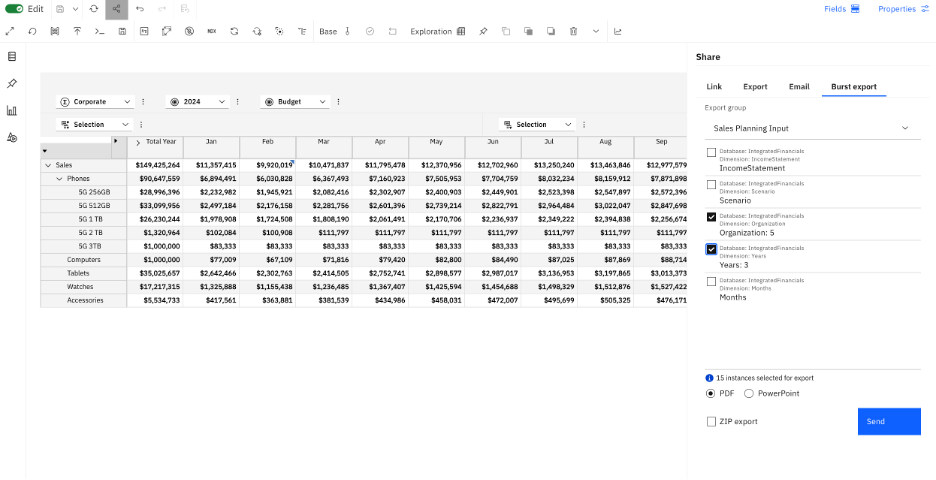
PLEASE NOTE - When you choose a hierarchy, the member count appears below the hierarchy’s name. If you pick multiple hierarchies, the total exportable instances are calculated from all data combinations of the selected hierarchies. You can export up to 100 instances.
Dynamic to Static Set Conversion – In the Planning Analytics Workspace set editor, moving members will switch a dynamic set to a static set. Converting to a static set removes the MDX expression and retains only the current members.
Improved Member Numeric Formats - Now, when you apply a numeric format to the Data area in a view using the Format Manager, member numeric formats are preserved. Previously, applying formats to the Data area would replace the members' numeric formats.
More Actions in Planning Analytics Assistant – There are 3 new actions, List, Undo and Redo. Plus, there are additional calculation abilities in the assistant. You can see the full list below. The Planning Analytics Assistant was released a month or so ago and IBM will be adding many more capabilities to the assistant in the coming releases. Please reach out to me at services@lodestarsolutions.com to discuss the assistant in more detail. You can see the complete list of support actions here: Use the Planning Analytics AI assistant to interact with books using natural language - IBM Documentation.

Numeric Filters in Cube View - You can now filter rows and columns based on cell values in a cube in Planning Analytics Workspace. Two new filters have been added to Planning Analytics Workspace: Filter by count and Filter by value.
Modeling
Locking and unlocking elements - When an element is locked, only users with Admin rights can update its data. The user who locks it cannot make updates unless they also have Admin rights. This feature helps permanently archive data, with locks remaining even after server shutdown.
PLEASE NOTE – to use this feature you must be on IBM Planning Analytics 2.0.9.19/TM1 11.8.023.
MDX Editor Updates – You can see the list of all updates here: MDX editor updates - IBM Documentation.
Add Notes to Modeling Workbench - You can now add notes to a modeling workbench to keep track of your work, document the purpose of an object or workbench, or instruct team members on the use of a workbench.

Administration
Satellite Connector Now Available (Cloud Only) - IBM® Satellite Connector is the new VPN tunneling technology from IBM, offering a secure link between IBM Planning Analytics on Cloud and your private network with on-premise data.
Unlike Secure Gateway, Satellite Connector has no bandwidth egress limits, supports more concurrent incoming connections, latest VPC networking, and increased client connections for high availability.
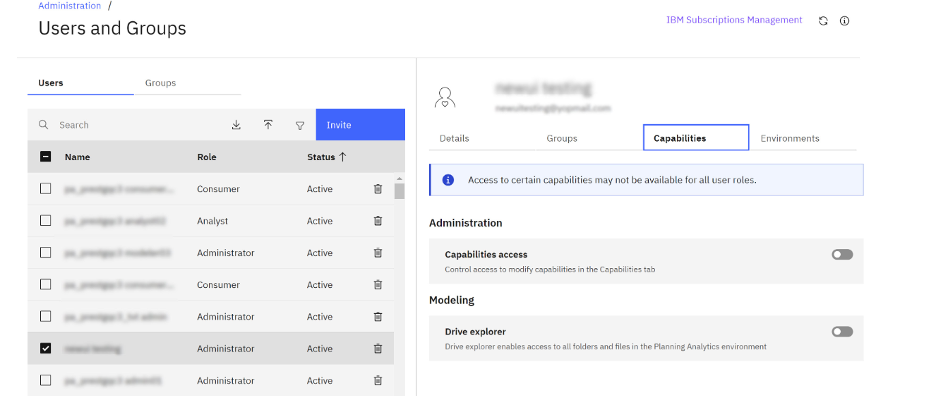
Manage User Capabilities (Cloud Only) –
Summary
There you have it! Everything new in the latest release, Planning Analytics Workspace 2.1.5. Bursting is sure to be an enhancement that excites a lot of people. I wish it had the capabilities to email the files, but I can see that being added as an enhancement in the near future!
Reminder – the end of support for Planning Analytics 2.0.x version is coming in April 2025. What does that mean? See the following blog for important information and why you should start discussion around upgrading today! End of Support for Planning Analytics 2.0.9 - Lodestar Solutions
Please reach out to me at services@lodestarsolutions.com to schedule your upgrade discussion today!
