



Written by Michael Bernaiche, January 30th, 2025
Motio CI can make migrating to the cloud less daunting, especially when it involves a complex system like Cognos. Utilizing Moto CI and with careful planning and a methodical approach, you can ensure a smooth transition that is both safe and efficient.
Here's a step-by-step guide to help you navigate this process with Motio CI.
Analyzing the Differences
An on-premise cloud implementation can differ significantly from a Cognos in the Cloud environment. Key differences include:
Additionally, moving data sources to the cloud can enlarge the scope of the project, introducing more risk. It's crucial to address these differences early in the planning phase.

Setting Up a Sandbox Environment
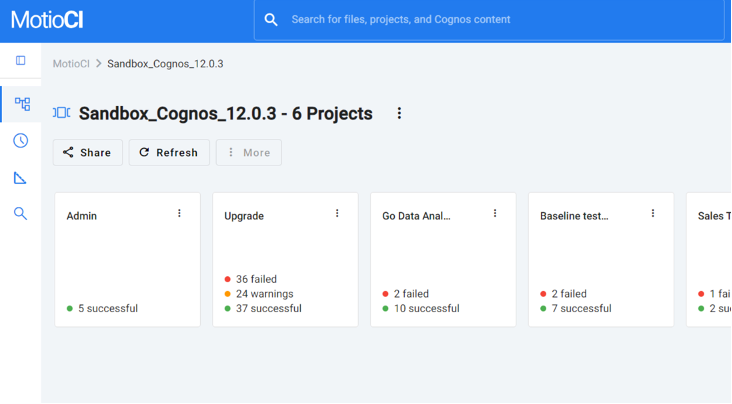
To ensure a smooth migration, set up a sandbox environment where you can make step-by-step changes. This allows you to test each change thoroughly before moving on to the next step. The sandbox should be as close to your production environment as possible, containing all objects such as security settings, data sources, packages, reports, report views, queries, and job schedules.
Cleaning Up
Before migrating, clean up your current environment:
- Update Old Specifications: Ensure all specs are up-to-date.
- Delete Old Reports: Remove reports that are no longer needed.
- Remove Disabled Users: Clean up user accounts to streamline the migration process.
Prioritizing Changes
Determine the order of changes to make:
- Cognos Upgrade: Upgrade to the latest version of Cognos.
- CQM to DQM: Transition from Compatible Query Mode to Dynamic Query Mode.
- Authentication Provider: Update the authentication provider to match the cloud environment.
- Operating System: Ensure the OS is compatible with the cloud environment.
- Database: Migrate the database to the cloud.
- Data Sources: Move data sources to the cloud.
Using the Cognos Sandbox Methodology
A Cognos sandbox acts as a steppingstone between your production environment and the cloud. It should be a version similar to your current production environment and contain all necessary objects.
MotioCI can connect your production environment to the sandbox and the Cognos Cloud environment. It is used for:
- Baseline Testing: Establish a baseline to compare against.
- Identifying Issues: Detect any issues that arise during migration.
- Retesting Remediations: Ensure that any fixes are effective.
- Monitoring Production: Keep an eye on ongoing development and self-service activities.
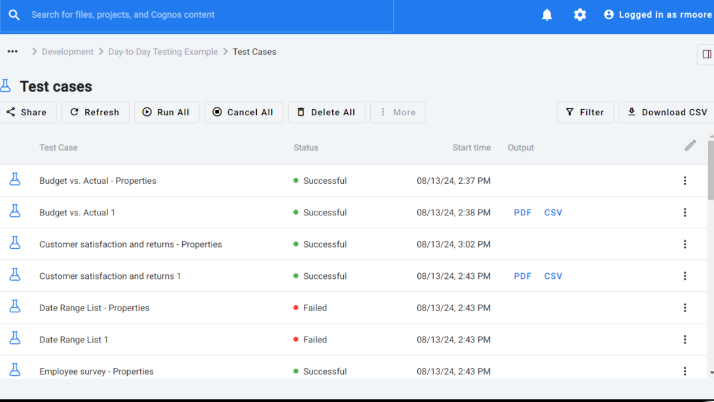
Result
By following these steps, you will achieve a fully working Cognos Analytic Sandbox, ensuring a safe, easy, efficient, and quick migration to the cloud.
More Information
Migrating to the cloud doesn't have to be overwhelming. With careful planning, a methodical approach, and the right tools, you can ensure a smooth transition that meets your needs. Happy migrating! For more information reach out to services@lodestarsolutions.com or check out https://motio.com/motioci/
Click here for a blog I recently wrote about the most recent version of Cognos Analytics 12.0.4.
Below are some links to all Motio software for Cognos Analytics.
Motio PI and PI Pro – Enhance Cognos management with quick access to system content and mass updates. Support tasks like searching, replacing, and updating information, saving time on administrative work.
Report Card - Optimize Cognos by tracking user interactions and system performance to pinpoint issues, prevent problems during upgrades, and receive real-time alerts for quick resolution using actual system data.
MotioCAP - Integrate Cognos with your security provider to eliminate in-house coding, ensure up-to-date security, support SSO with SAML tokens, and manage updates seamlessly.
PersonaIQ - Facilitate smooth Cognos authentication transitions by mapping users and consolidating sources. Preserve security IDs, minimize disruptions, and reduce downtime during namespace changes.