


Written by Mike Bernaiche, 10/16/2025
In today’s fast-paced business landscape, organizations are under constant pressure to make faster, smarter decisions. Financial planning and analysis (FP&A) teams are expected to deliver insights in real time, adapt to changing conditions, and streamline operations—all while maintaining accuracy and governance. Enter IBM Planning Analytics PA Assistant an AI-powered tool designed to transform how businesses interact with their data and execute planning tasks.
Whether you're a seasoned TM1 modeler or a business user with minimal technical skills, the PA Assistant offers a powerful, intuitive interface that brings the full potential of IBM Planning Analytics to life. Let’s explore the features, benefits, and reasons why every Planning Analytics client should consider integrating this next-gen assistant into their workflow.
What Is IBM Planning Analytics PA Assistant?
The PA Assistant is an AI-driven feature embedded within IBM Planning Analytics, powered by WatsonX. It leverages natural language processing (NLP) and machine learning to allow users to interact with their planning data using everyday language. Instead of navigating complex models or writing formulas, users can simply ask questions like:
- “What were our sales by region in Q2?”
- “Show me a breakdown of expenses by department for 2024.”
- “Forecast revenue for next quarter based on historical trends.”
The assistant interprets these queries, fetches relevant data, and presents insights in real time—often with visualizations and contextual explanations.
Key Features of IBM PA Assistant
- Conversational Analytics
One of the most transformative features is conversational analytics. Users can interact with their data as if they were speaking to a colleague. This democratizes access to insights, enabling non-technical users to explore data without needing to understand TM1 structures or write MDX queries.
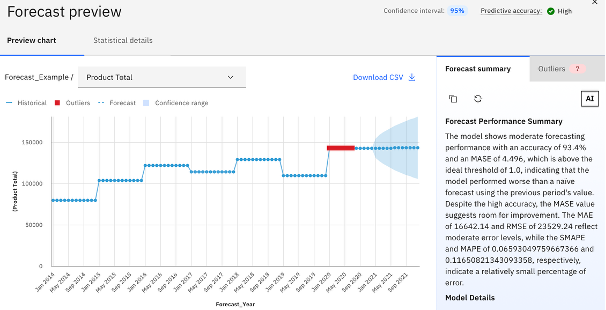
- AI-Powered Forecasting
The assistant uses predictive analytics to analyze historical data and forecast future trends. It automatically selects the most accurate model from multiple algorithms, helping users identify risks and opportunities with precision. This is especially useful for budgeting, demand planning, and scenario modeling.
- Agentic Capabilities via WatsonX Orchestrate
With the latest integration of WatsonX Orchestrate, the PA Assistant evolves from a passive responder to an active orchestrator. Users can automate workflows, trigger approvals, and sync downstream systems—all from a natural language prompt. This brings agility and automation into everyday planning and decision-making.
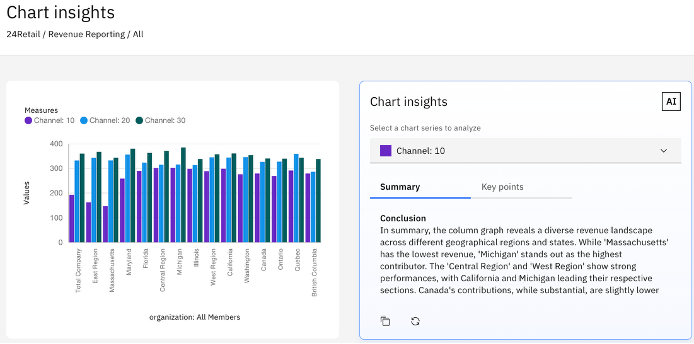
- Chart Insights and Visual Explanations
The Assistant now includes Chart Insights, allowing users to select a chart and instantly receive a natural language summary of key points, trends, and outliers. This feature is powered by generative AI and helps users understand visual data without needing to interpret complex graphs.
- Explain Cell and Rule Tracer
For TM1 modelers, the Explain Cell feature is a game-changer. It decodes the logic behind any cell in a crosstab, helping users understand how values are calculated. This improves transparency, supports audit requirements, and accelerates troubleshooting.

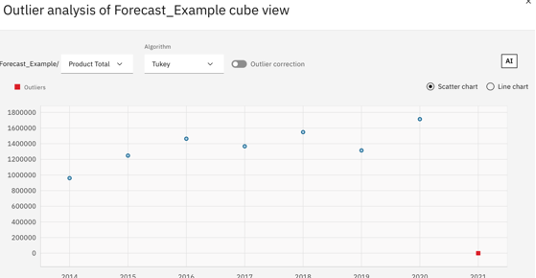
- Outlier and Impact Analysis
The Assistant can identify outliers in datasets and perform impact analysis to uncover dependencies and correlations across variables. This helps teams spot anomalies early and understand what’s driving performance—critical for strategic planning.

- Multilingual Support
To support global teams, the Assistant is available in French, Spanish, German, and Japanese, making it accessible to users across regions
Why Clients Should Add PA Assistant to Their Planning Analytics System
- Boost Productivity and Efficiency
By automating repetitive tasks like data updates, model refreshes, and month-end close processes, the Assistant frees up valuable time for FP&A teams. Users can focus on strategic analysis rather than manual data manipulation.
- Empower Business Users
The Assistant lowers the barrier to entry for non-technical users. Executives, planners, and analysts can access insights without relying on IT or data science teams. This fosters a data-driven culture across the organization.
- Accelerate Decision-Making
Real-time insights and scenario comparisons help teams respond confidently to changing market conditions. Whether it's adjusting forecasts or evaluating new strategies, the Assistant provides the clarity needed to act quickly.
- Enhance Governance and Trust
Built with enterprise-grade security and governance, the Assistant ensures that data access and automation comply with organizational policies. IT teams can trust that the Assistant operates within defined boundaries.
- Future-Proof Your Planning
With IBM’s ongoing investment in AI and WatsonX, the PA Assistant is continuously evolving. New features like agentic orchestration and generative AI insights ensure that your planning environment remains cutting-edge.
Real-World Impact
Imagine a VP of Finance preparing for an executive meeting. Instead of requesting reports from IT or navigating multiple views, they simply ask the Assistant: “Show me Q3 revenue by product line.” Within seconds, they receive a chart-ready visualization with key insights. This kind of responsiveness can transform how leadership teams operate.
Or consider a new analyst joining the team. With the Assistant guiding them through dimensions, hierarchies, and visualizations, they can become productive within days—not weeks.
Final Thoughts
IBM Planning Analytics PA Assistant is more than just a helpful tool—it’s a strategic asset. By combining the power of AI with the flexibility of TM1, it empowers organizations to plan smarter, act faster, and stay ahead of the curve. Whether you're looking to improve forecasting accuracy, reduce manual effort, or democratize data access, the PA Assistant delivers.
For all things PA Assistant, check out this link: https://www.ibm.com/products/planning-analytics/ai-assistant
Please note this is an add on license and you can start with a minimum of 5 at a great price! Reach out to use at services@lodestarsolutions.com to discuss in more detail.
If you're already using IBM Planning Analytics and haven’t yet explored the Assistant, now is the time.
It’s not just cool—it’s crucial.
