



Written by Mike Bernaiche- IBM Analytics Practice Lead at Lodestar Solutions and IBM Champion, June 19th 2025
IBM continues to evolve its IBM Planning Analytics Workspace (PAW) platform with the release of version 2.1.11 (104), rolled out on May 22, 2025. This update builds on the momentum of previous releases, delivering a suite of enhancements that improve usability, modeling flexibility, and administrative control. Whether you're a modeler, administrator, or end-user, IBM Planning Analytics Workspace 2.1.11(104) offers something to elevate your planning and analytics experience.
Books and Reporting:
IBM Planning Analytics Workspace 2.1.11(104) continues to refine the Books and Reporting interface. IBM has introduced enhancements that make it easier to build and interact with dashboards and reports:
- Customize the color of selected and highlighted cells – you can now customize the color of the background and the border of any cell that you select and any highlighted cell that is associated with the selected cells.
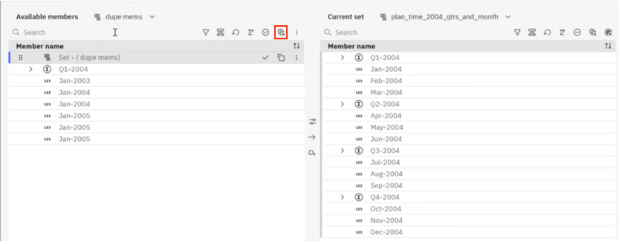
- Remove duplicate members from the set editor – in the Set editor, click the Remove duplicated members icon in the Available members’ panel. The Available members panel displays only distinct members, which you can use to compare with the current set.
- Additional options for sharing visualizations as PDF files – When you select PDF print settings for your visualizations from the General tab of the Visualization properties, you can now choose between In view and New page.
- If you select in view, the PDF file prints the visualization exactly as it is shown in the dashboard.
- If you select new page, the PDF file prints all the data from the visualization, regardless of what is shown in the dashboard. The PDF file first shows all the columns in the visualization, then all the rows. The PDF file has a new page after it prints several columns up to the specified number, then a new page after it prints several rows up to the specified number. You can also specify whether want to fit all columns in one page and all rows in one page.
Modeling:
Modelers will appreciate the new capabilities that streamline development and reduce the need for workarounds:
- Export forecast values to a csv file – The resulting CSV file contains data exported into the following columns.
- Name of the tuple or the selected row.
- Forecast periods from the time dimension.
- Forecast slice, which consists of forecast values, high values, and low values.
- Actual values for each of the slices and the corresponding forecast time period.
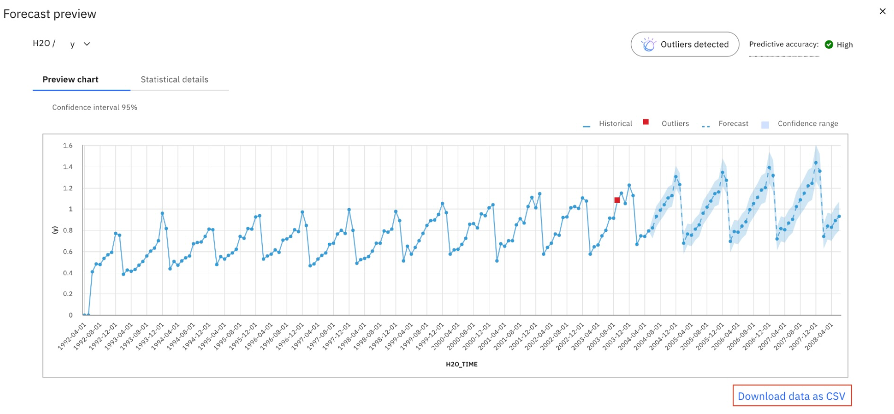
- Specify multivariant options for baseline forecast – You can now create multivariate types of baseline forecasts. Multivariate forecasts allow you to specify a maximum of two variables for the baseline forecasts.
- Use new Database Explore to view and perform actions on databases – The Database explorer opens a properties tab with the name of the database, which displays a table with the main TM1 objects that you can view, along with the numbers of each object in the specified database. Click the item count to open a table that displays all the specified objects in the database. You can select multiple objects in the table and perform a bulk action on all selected objects. For example, you can choose to unlock multiple cubes.
Administration:
PAW 2.1.11 introduces a couple of new administrative features that enhance security and governance:
- Access Control Lists (ACLs) in Drive Explorer: Admins can now manage user access to shared folders in the S:/ drive using ACLs. This brings PAW’s file management closer to enterprise-grade document control systems.
- Show API key expires date (cloud only) – If you generate API keys using MCSP, these keys are valid for 12 months. After you create an API key, the expiration date of the key now appears in the existing API key table in a new column.
Important Notice: End of Support for Planning Analytics 2.0
IBM has officially announced that support for Planning Analytics 2.0 will end in October 2025. This means that organizations still running on version 2.0 will no longer receive security updates, bug fixes, or technical support after that date.
If your organization is still using Planning Analytics 2.0, now is the time to plan your upgrade to the 2.1 series. With each release, including 2.1.11, IBM has introduced significant improvements in performance, usability, and governance. Upgrading ensures you remain supported and benefit from the latest innovations in the platform. Reach out to us at services@lodestarsolutions.com to find our more about our services and how we can help you!
Final Thoughts
IBM Planning Analytics Workspace 2.1.11(104) continues IBM’s trend of delivering meaningful enhancements with each release. From smarter reporting tools to more flexible modeling and tighter administrative controls, this version empowers users at every level of the organization.
If you’re still on an earlier version of PAW, especially 2.0, upgrading to 2.1 is not just recommended—it’s essential. The clock is ticking toward the October 2025 support sunset, and the benefits of moving to 2.1.11 make the transition well worth it.
Stay tuned for more updates and walkthroughs as we continue to explore the evolving landscape of IBM Planning Analytics. In the meantime, check out all of our planning analytics blogs here: https://lodestarsolutions.com/cognos-tm1/
