


 Written by Mike Bernaiche, 09/26/2025
Hot off the software presses, IBM has released the latest version of IBM Planning Analytics Workspace 2.1.14 (107). As you may know, IBM released updates to Workspace every month keeping you Planning Analytics software updated is important to stay ahead of the game!
REMINDER – This will be the LAST release on Planning Analytics 2.0 version (107) and all future releases will be 2.1.x. End of support for Planning Analytics 2.0 is quickly approaching in Oct 2025. This means that you should be on Planning Analytics 2.1. If you have not upgraded yet, please reach out to us ASAP to discuss this end of support and upgrading to PA 2.1 Reach out to us at services@lodestarsolutions.com.
Books and Reporting
Set permissions on multiple assets – Set permissions on multiple assets at once in both the Reports and Analysis and the Data and Models areas.
You can select multiple items by selecting the corresponding checkboxes, then use the new Set permissions option in the multi-select toolbar to apply the changes to all items at once.
Customize notifications for processes run from action buttons – You can use action buttons in Workspace books to run TurboIntegrator processes. Previously, if a process that was run from an action button returned a quit status, the action button treated it as a successful run and displayed the success message. With this feature, you can now configure distinct messages for both successful and quit outcomes, which gives users clearer feedback when a process exits early.
Content navigation performance improvements – Content navigation is now faster in the Reports and Analysis, Data and Models, and Plans and Applications areas.
The performance improvements also result in faster load times when you browse folders (especially folders with many assets) and when you copy or move content.
Applications and Plans
There are a couple of BIG enhancements to the applications and plans area in Planning Analytics Workspace 2.1.14 (107)!!
Assign ownership and track progress with data accountability – This makes contributors and reviewers accountable for submitting changes, analyzing data, and approving or rejecting submissions for their assigned members in a TM1hierarchy.
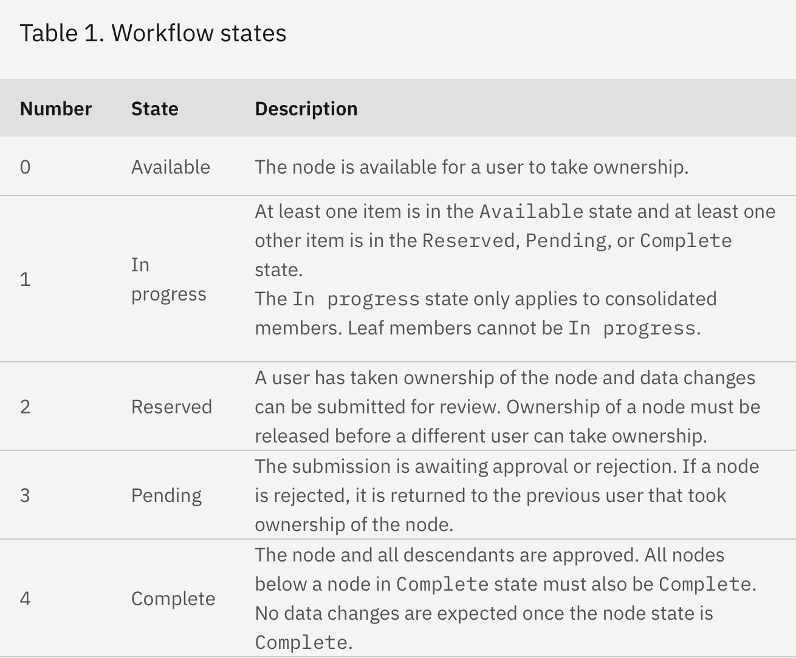
You configure accountability with a validated subset or hierarchy from your TM1 model. Each member becomes a node with a workflow state (available, reserved, pending, complete, or in progress) tracked in a state cube. As users interact with the plan, node states update automatically, and changes cascade to ancestor and descendant nodes to reflect progress.
Data accountability also introduces task history, notifications, and TM1 objects that support tracking and automation. Contributor and reviewer actions, like taking ownership, submitting, approving, or rejecting, are logged and trigger updates to the plan state. This structured workflow experience helps you manage responsibility across your planning process and mirrors key aspects of TM1 Applications.
Automate plan actions with workflow processes – Use workflow processes to trigger TurboIntegrator actions based on user activity in Planning Analytics Workspace plans.
You can configure TurboIntegrator processes to run when tasks are activated or deactivated, when contributors take ownership or submit changes, and when reviewers approve or reject submissions.
Workflow processes pass plan-specific details (such as the plan ID, task ID, and member from the data accountability hierarchy) into the TM1® process. You can also define static values for parameters, making it easier to reuse processes across multiple events. Use workflow processes to perform tasks such as assigning security, managing TM1 groups, and locking or unlocking data slices by using the TM1 security overlay feature.
Processes run under the credentials of the user who triggered the event and execute after the plan state is updated. To ensure successful execution, users must have appropriate access in the TM1 Database.
Data and Modeling
Open process logs in a dedicated workbench – View and debug process logs in a separate tab while you are working with the process.
You can now open process logs as a separate tab in the modeling workbench. Previously, logs were only available in a modal window. With this enhancement, you can open logs in multiple tabs and monitor them in real time while you are editing or running processes, which makes process development and troubleshooting more convenient.
Hierarchy editor “expand all” option no longer reveals hidden members – From the hierarchy editor, the Expand all button no longer reveals members that were previously hidden by using the Keep or Hide options. This change makes sure that hidden members remain hidden even when expanding all consolidated members.
Summary
Just a few items enhanced and changed in books and reporting and modeling. However, applications and plans have two new huge enhancements. Many have been asking for accountability and ownership in this area. Well, IBM delivered!! To see all changes in Planning Analytics Workspace you can check this link out. https://www.ibm.com/docs/en/planning-analytics/2.0.0?topic=features-whats-new-in-planning-analytics-workspace
Reminder- if you have not upgraded yet, please reach out to us ASAP to discuss this end of support and upgrading to PA 2.1 Reach out to us at services@lodestarsolutions.com.
