


Written by Mike Bernaiche, December 5th 2024
IBM has recently launched Planning Analytics Workspace 2.0.6 for Planning Analytics (PA) 2.1, and version 99 for PA 2.0. Before you proceed with the upgrade, it's essential to be informed about the various enhancements. Please read below for everything new in this version.
Books and Reporting
Additional Language Support for PA Assistant – The PA assistant now supports English, French, Spanish and German. For more info on the PA Assistant please see this link.
Advanced Synchronization Options for Member Change - Two new options, Member and leaves and Leaves, are now available for member change events under Advanced synchronization. The Advanced synchronization feature allows you to customize how each hierarchy in the cube viewer or visualization displays when a synchronization event is received by that widget. When a member change synchronization occurs, in addition to other options, you can now choose to display the member and its leaves or just the leaves in the widget that is receiving the synchronization event.
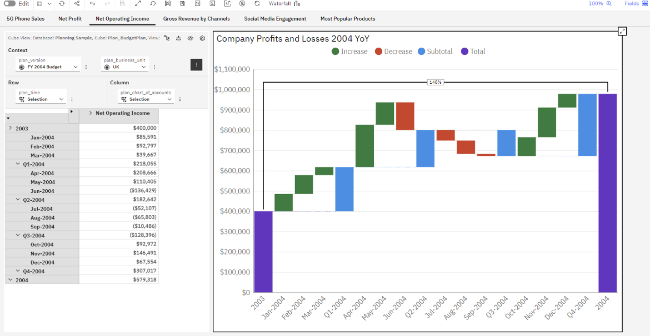
New Waterfall Visualization - The new visualization is named Waterfall. The preexisting waterfall visualization is renamed to Legacy waterfall, and can still be used. When comparing the new waterfall visualization to the legacy waterfall visualization, the following two options in the new visualization significantly improve the user experience:
- The Change the bar type as option in the bar right-click menu.
Use this option to change the bar type to one of the following types: Auto, Delta, Adjustment, or Subtotal.
- The Accumulate totals property under Visualizations > Data. Use this property to correctly render values from multiple Total bars in the visualization instead of changing the TM1 data.
Use Action Buttons to Synchronize Group and Hierarchies - With the new Advanced context feature in action buttons, you can now pass context and synchronize groups between books on navigation. Widgets in the same group synchronize together. You can also select which hierarchies are used to pass context.
Roll Back Changes Button - This button is disabled when none of the views in the workbench contains changed values. As soon as a value is changed in any view, the button is enabled and remains enabled as long as any view contains changed values. Even if you save and close the view with the changed value, and save and close the workbench, the button remains enabled unless you commit the data.
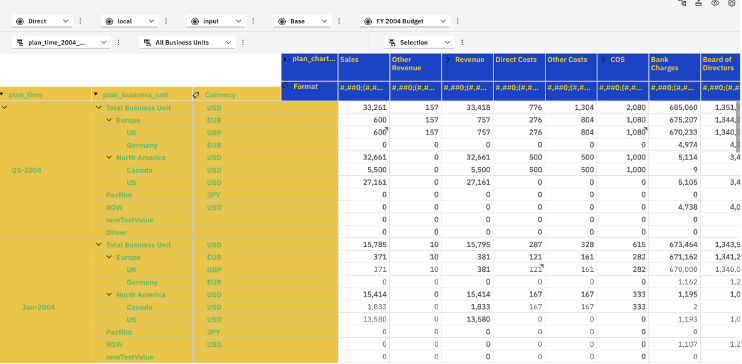
Thumb Cells Formatting –
Modeling
Drive Explorer – New enhancements include:
- View the number of files in explorer -
- View disk space – total disk space used and remaining
- Inline notifications – displays status of actions
- Improved unzipping of files -
- Tm1s.log – now visible
- Speed enhancements
Improved Verification on File Uploads – Planning Analytics now recognizes the type of file extension and determines the validity of the extension. Files identified include:
- Text files (such as .txt, .csv, .css, .html)
- Application files (such as .docx, .json, .ics, .xml, .php, .pdf, .zip, .7z, .rtf, .rar, .xlsm)
- Image files (such as .jpeg, .jpg, .svg, .gif, .png, .heic)
- Font files (such as .tff,. woff, .otf)
- Video files (such as .mp4, .mpeg, .avi)
- Audio files (such as .mp3, .wav, .weba, .mid)
Export Data from Cube or View - You can now export data from a cube or view to a .csv file. The exported file is saved to your local Downloads directory.
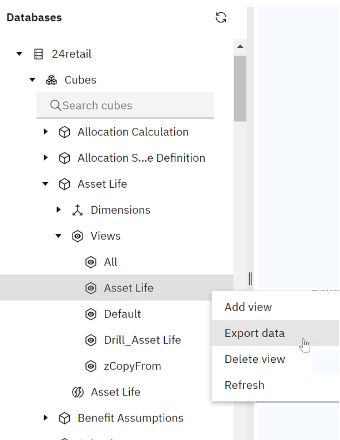
Export Dimension to .csv- You can now export a dimension or a dimension hierarchy to a .csv file. The exported file is saved to your local Downloads directory.
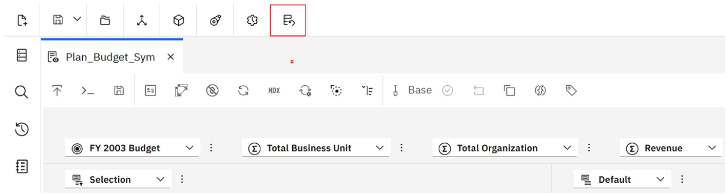
Manage Users and Groups on PA Local Database - You can now manage Planning Analytics local database users and groups from the modeling workbench.
Summary
There are lots of great enhancements in Planning Analytics Workspace 2.0.6 with plenty more to come! Hint – stay tuned for some exciting stuff!
Reminder that the end of support for Planning Analytics 2.0 is coming in April. Do not delay, decide to upgrade now. You can reach out to me at services@lodestarsolutions.com to discuss your needs and take advantage of our great upgrade offers!
You can read more about the end of support and what that means here.
For a detailed list of everything new in Planning Analytics Workspace you can check out this dedicated IBM page.
