


Written by Mike Bernaiche, 02/03/2025
In the latest release of Planning Analytics Workspace 2.1.8 (2.0 version 101), IBM has enhanced an already incredible product. With big updates to books and reporting, plans and applications and modeling, this release brings some great additions especially to the PA Assistant and action buttons. Continue reading below for everything new in Workspace and some additional new items in Planning Analytics for Excel.
Books and Reporting
Use AI to generate cell explanations - with the new Explain Cell feature, it provides a summary of the values, logic, and sources contributing to a specific cell value, which may result from complex calculations, rules or several consolidations.
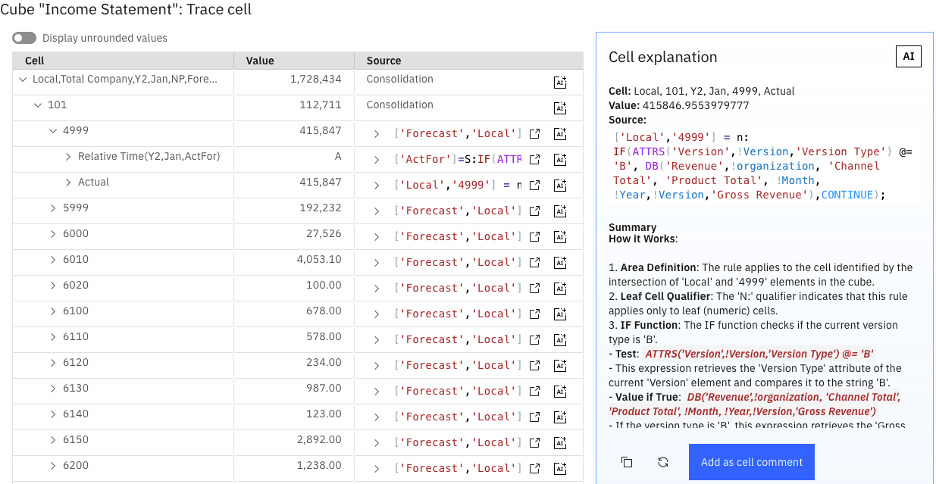
Have you ever wanted to truly understand what is rule is doing in Planning Analytics? Now with Workspace 2.1.8, you can get a true explanation of the rule (calculation). The Explain cell feature uses granite-3-8b-instruct from the Granite family of IBM foundation models to generate a descriptive summarization of the cell intersections
PLEASE NOTE- the explain cell feature is part of the Planning Analytics Assistant, which requires a separate license.
In my last blog, Whats New in Workspace 2.1.7, I explain everything new in the Planning Analytics Assistant. From AI insights to outlier and impact analysis, the new Planning Analytics Assistant can bring power AI to your Planning Analytics practice.
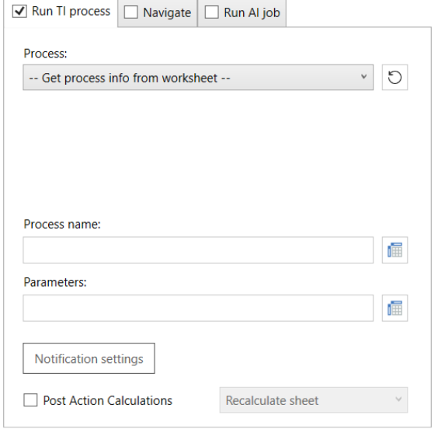
New design for the Action Button configuration options – find all the configuration option for actions button on a new configuration tab in the action button properties. Run process, Run Ai job and Navigation all quickly available in the new tab.
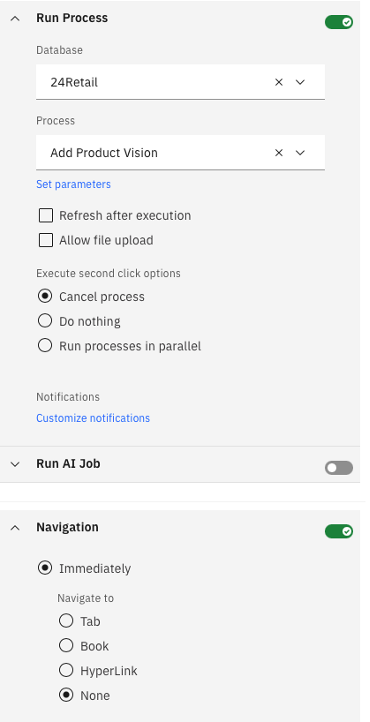
Planning Analytics Workspace 2.1.8 now enables advanced configurations for TurboIntegrator processes and navigation within books or tabs - Users can execute a process, an AI job, or both from an Action Button, with the option to navigate immediately or after the process completes.
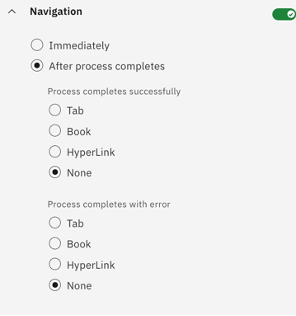
Implement custom notification for TurboIntegrator processes-Users can now configure notifications to display the status when a TurboIntegrator process is run from an action button. Notifications can be set to indicate if a process completes successfully, completes with a warning, or fails.
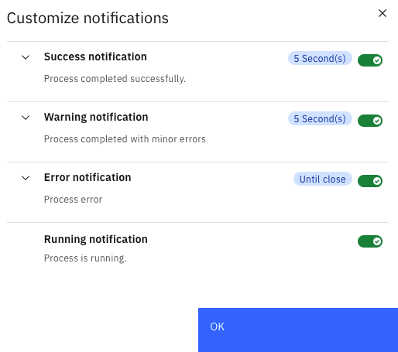
Add cell values as parameters in TurboIntegrator processes that are run from an Action Button - You can now configure custom notifications to display when a TurboIntegrator process is run from an action button to display its status. Create a notification to display when a process completes successfully, completes with a warning, or fails.
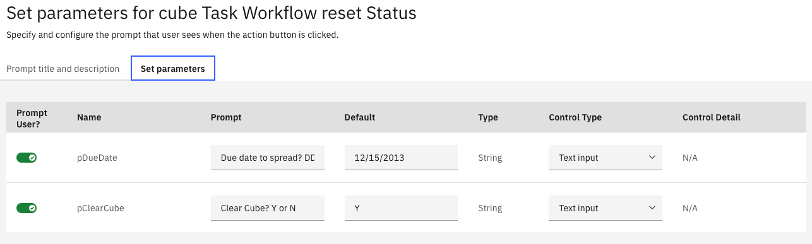
Customize action button parameter title and description - You can now customize the Action Button parameter title and add descriptions for processes that need parameters. When running the process, the prompt dialog shows your custom title and description. This feature helps provide context and instructions for setting parameters.
Customize cell color based on data state – The enhanced property now allows you to set custom colors for rule-derived, read-only, and sandbox cells. This feature is now located in the Format manager under Data area.

New sorting options for views and sets in the Database tree – new folder structure in database tree now lets you sort views in to public and private folders.
Change search scope in the set editor – set editor now includes an option to search on current set members or the current set members and their descendants.
Expand and collapse levels in set editor – a new button allow you to expand all consolidations at once or a selected level.
Export options in books - The export options for a cube and cube view, and for a dimension and dimension hierarchy, are now available from a book in the same way as they are available from the modeling workbench.
Create filters based on a string value – the filter by value option in the cube viewer now supports string values wit the following operators available:
- Is (equal to)
- Is Not (is not equal to)
- Contains
- Starts with
- Ends with
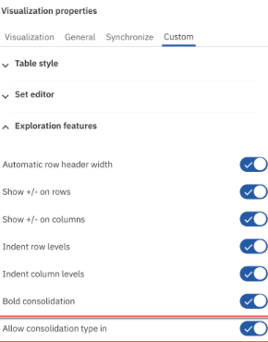
Manage data entry and data spreading in consolidated cells - When data is entered directly into a consolidated cell, the Planning Analytics database performs a proportional data spread. To avoid unintentional data spreading, an option to allow or prevent direct data entry in consolidated cells is now available. This option can be set as a property of an individual exploration; if a book contains multiple explorations, the property can be configured independently for each exploration.
Support for parameters in the IBM Planning Analytics Workspace MDX editor – For more information and how to use parameters in MDX please click here.
Applications and Plans
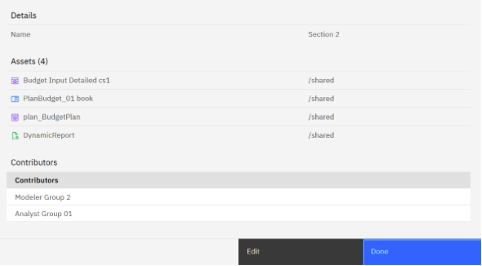
Summary pages in applications and plans – sections in applications and plans now have a summary page in Planning Analytics 2.1.8. Summary page provides a compact view of the assets of that section or task.
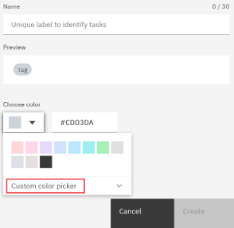
Custom color picker for tags:
Modeling
Copy menu added to the Modeling Workbench - The Copy menu allows you to copy different parts of member and hierarchy scripts to the clipboard, which allows you to more easily edit the MDX, rules, and TurboIntegrator processes.
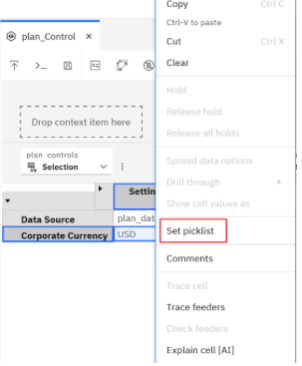
Users in the modeling workbench can now generate pick lists directly within the cube - view by selecting one or more cells. This new method simplifies the process of setting up pick lists compared to prior methods, which are still supported.
Users are guided through the creation of the pick list. The type of pick list that can be generated is dependent on the cell type. For numeric cells, the pick list typically consists of a range of selectable numbers. For string cells, the pick list is a static list that allows for quick entry and editing of items. In the case of hierarchies and subsets, users can choose from an existing dimension and hierarchy.
Open process error logs directly from the server log - The Planning Analytics server log contains information about process execution. When a process encounters an error and generates a process error log, you can now open the process error log directly from the server log.
Enhance Baseline Forecast Flexibility by Permitting User Overrides - Administrators or modelers can now enable an option allowing users to override default forecast members and define a custom scope when executing a baseline forecast. This enhancement increases the flexibility of baseline forecasts for users and simplifies maintenance for creators, who will no longer need to develop and manage multiple forecasts with similar but varied scopes.
Planning Analytics for Excel (PAfE)
Planning Analytics for excel continues to be enhanced with new features and reporting types like Universal reports, and other items. Before we get to what is new in the latest release. Let me explain what universal reports are.
Universal reports are hierarchy aware and parameterized reports which can dynamically execute formulas and queries against the TM1 server. These reports are driven by TM1SET formulas and using named ranges and schemas you can utilize parameterization. In short, these reports allow user to build complex and sophisticated reports. In the highly formatted dynamic reports, users can only insert cells as new rows. Universal reports support cell-based insertion and rows and columns can be toggled to expand and collapse even if there are multiple universal report on 1 sheet.
In the December release of Planning Analytics for Excel, the preserve user formula property was added, and this determines if formulas are saved when a refresh occurs by setting this property to true or false.
TM1SetDropdownLimit – this setting allows a user to set the limit for the number of members in a set that are rendered in a drop-down menu. The default value is 500 and you can the value to any number greater than zero.
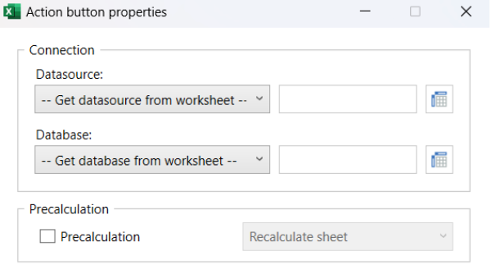
New design for action buttons creation – Like the action buttons in Planning Analytics Workspace 2.1.8, action buttons in excel get a refresh with new features. Please see this link for everything new.
Summary
Wow! There was a ton to write about in the latest release of Planning Analytics Workspace 2.1.8 and Planning Analytics for Excel. Please reach out to me at services@lodestarsolutions.com to talk about the Planning Analytics Assistant. Yes, there is an additional licensing cost, however you can start small with a few users, harness the power and start to add in other users over time. For the price of a few cups of coffee, a month you can modernize you PA environment with the assistant and get the power of additional AI insights for your data.
