



Written by Mike Bernaiche, May 8th 2025
It is time for the next release for IBM Planning Analytics! Planning Analytics Workspace 2.1.10 (103) is out and there are some excellent additions to this release. (at the time of this blog 2.1.10 has not released and will be out very soon) Candidly, the last few releases have been great and loaded with amazing enhancements to the PA Assistant, formatting, modeling and so much more! I’ve done all the research and explored the new features and will talk about each below.
Important items to cover before we start!
- End of support for Planning Analytics 2.0 is quickly approaching in October! What does this mean? In short, to continue to receive IBM support on Planning Analytics you will need to either upgrade to Planning Analytics 2.1 or move to IBM PA SaaS. Read below for more info! https://lodestarsolutions.com/end-of-support-for-planning-analytics-2-0-9/
- Planning Analytics Assistant – Over the last few updates the PA assistant has improved significantly. This is an add on licenses that can start at 5 users. Please reach out to me at services@lodestarsolutions.com to explore adding this to your environment.
- Moving to PA SaaS and options available – There are many options available to move from on premise software to SaaS (Software as a Service). There is also a program we can explore with IBM to offer 1 year of dual entitlements for both on prem and SaaS. We have moved several of our clients to SaaS using this program and it has been very well received! Reach out to me at services@lodestarsolutions.com to discuss sin more detail. Meanwhile, you can check out this blog that talks about PA on AWS option. NOTE – this is also available on Azure now!
Ok, now that we have covered these items, on to what is new in Planning Analytics Workspace 2.1.10 (103).
Books and Reporting
Create Views Using Natural Language (Cloud only today) – A new AI feature has been added to the Planning Analytics Assistant called Data Explorer. This long-awaited feature allows you to create views using natural language.
There is a 2-step process to enable this for cube views.
- From modeling workbench, you need to analyze your cubes.
- From your book, you then click the AI button and choose data explorer and write your query using normal natural language.
Example screenshots:
Analyze Cube


Data Explorer
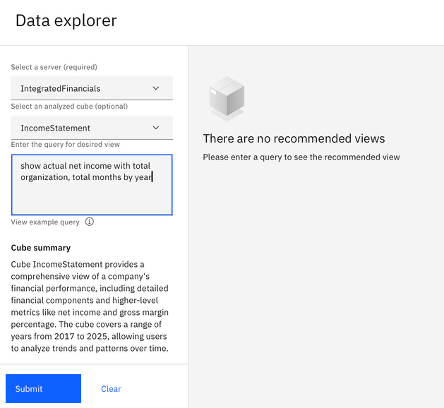
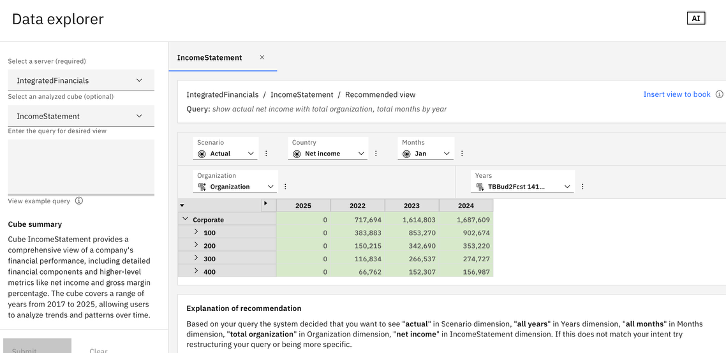
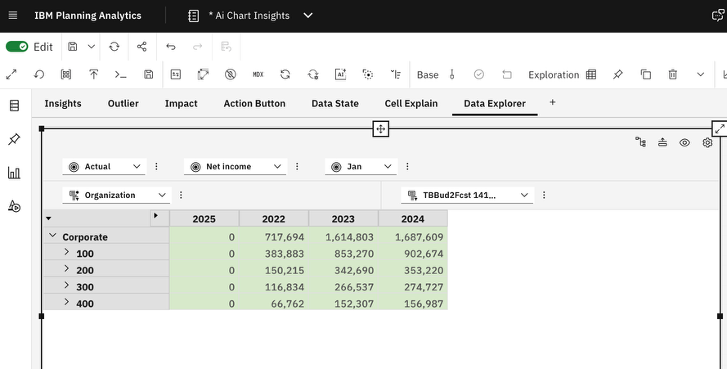
As you can see by typing in the query box with just some simple language, you can quickly create a view for use!
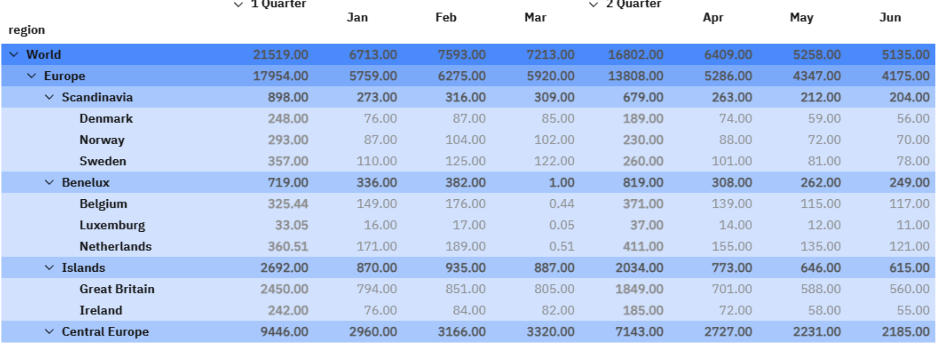
Format Manager to Apply Formatting to Hierarchies – you can now apply formatting rules to hierarchies in views. There is a new Hierarchy tab in the format manager to create a formatting rule and apply it to a hierarchy. You can apply formatting rules as a base format, by level, by member attribute and member name.
Set Cell Background and Font Colors by Using Member and Hierarchy Formats – you can now define a member format to have a specific background color or font color.
Enhancements to the Parameter Control Types for TI Processes - The Dimension list control type was renamed to Member list and you can now choose if a member name or member unique name is passed to the process parameter. A new control type, Set list, now lets you pass a named subset or a selection in a TurboIntegrator process.
Modeling
New Auto-Complete Options in the Rules Editor Workbench Preferences – click on preferences and select Autocomplete leaf elements in rules editor options. Make sure full expression is toggled on.
Change the Member Type to Consolidate in the Dimension Editor – change the properties of a leaf member from numeric or string to a consolidation without setting children. IMPORTANT NOTE – this feature requires TM1 11.8.29 or Tm1 12.4.8 or later version.
Create Shortcuts to all TM1 Objects in the Workbench - The shortcut feature in the Planning Analytics Workspace modelling workbench now supports all object types in the TM1 database, allowing you to easily group, organize, and access modelling objects. Shortcuts to TM1 objects now save in the Applications folder in the data tree. *IMPORTANT NOTE – this feature requires TM1 11.8.29 or TM1 12.4.8 or later version.
Increase the Flexibility of a Baseline Forecasts by Allowing Users to Override Default Context Members - An administrator or modeler can now set an option that enables users to override default context members and specify a custom scope when running a baseline forecast. This makes baseline forecasts more flexible for users and simplifies maintenance for baseline forecast creators, who no longer need to create and maintain multiple forecasts with similar but varying scopes.
Administration
Set Database Thresholds and Alerts in TM1 Database 12 - You can now set database thresholds and alerts in TM1 Database 12 for Memory usage and CPU usage metrics.
When you set threshold limits, you define the parameters for the concern and critical states of the following metrics for an individual database:
- Memory usage - Measures database memory usage in GBs.
- CPU usage - Measures database CPU usage as a percentage of total CPU capacity on the system.
You can define the Warning threshold and Critical threshold for both metrics.
Summary
For everything new in Planning Analytics Workspace 2.1.10 (103) please visit https://www.ibm.com/docs/en/planning-analytics/2.0.0?topic=features-whats-new-in-planning-analytics-workspace
Now is the time to explore both upgrading to Planning Analytics 2.1, but also exploring a SaaS license. Plus, I would most definitely encourage you to look at the PA Assistant. It has really improved over the last few months!
Reach out to me at services@lodestarsolutions.com or check out my quick video at https://youtu.be/NX2gkQ3d_EY.
Data waits for no one. Upgrade smart — we’re here to help.
