


Written by Mike Bernaiche, 09/04/2025
Recently, IBM introduced new enhancements in IBM Planning Analytics Workspace 2.1.13 (106). Like always these updates are cumulative and you can upgrade to IBM Planning Analytics 2.1.13 (106) from any 2.1 version. If you need assistance or want to discuss upgrading, please reach out to us at services@lodestarsolutions.com. Reminder, IBM Planning Analytics 2.0 is going out of support in October. You can read more about that here. https://lodestarsolutions.com/end-of-support-for-planning-analytics-2-0-9/
Please read below for all the updated information.
Books and Reporting
Synchronize Sets to Action Icons – You can now synchronize sets, in addition to individual members, to action icons in Planning Analytics Workspace books. You can synchronize sets to pass a set of members as an MDX expression to a string parameter in a TurboIntegrator process.
Edit Calculations in Cube Viewer – a new edit calculation options appears when you right click on a calculated member in a view.
Parameterized MSX Queries in Books – You can now use parameterized MDX queries in Planning Analytics Workspace books to build views that go beyond the limitations of standard widget synchronization.
Multivariant Forecast Update – You can now use up to 3 variables in a multivariant forecast.
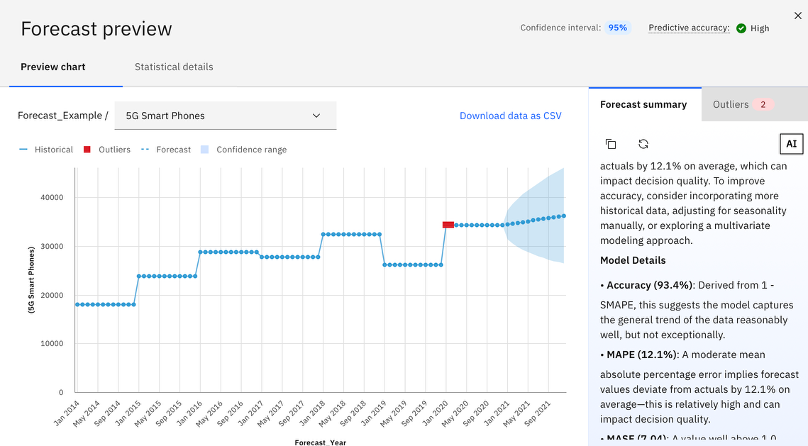
PA Assistant Insights with Forecasts – Forecast insights provide AI-generated explanations that describe the forecasted values and model accuracy for univariate forecasts.
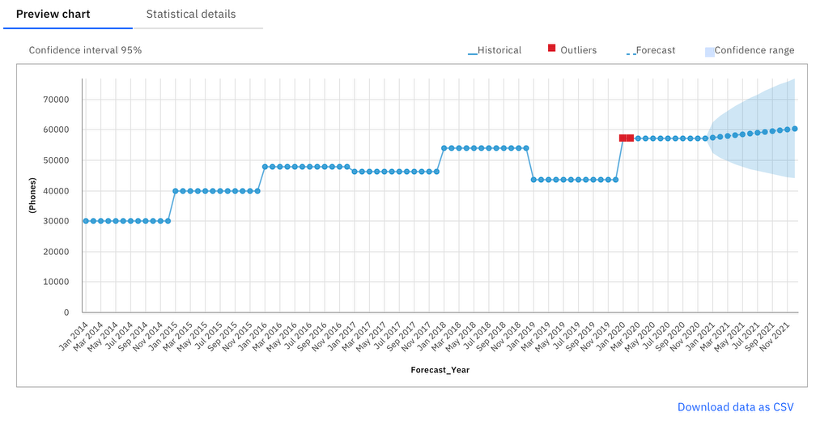
Export Forecast to .CSV
Plans and Applications
Keep the Contribution Panel Open or Closed – You decide if you always want to contribution panel open or closed. Now, when you close the panel, the interface retains this state. The next time you log in and open any plan or application, the panel remains closed until you choose to open it again. This preference is saved at the user level and applies across all plans and applications.
Data and Modeling
Save Export Options with Cube Views – When exporting data from a cube view to CSV, you can choose to include or exclude zeros, consolidations, and rule-derived values. You can also filter the Csv export to specific numeric or string ranges. Now, you can optionally save these export settings with the view, so that your preferences are already applied the next time you export from the same view.
Duplicate Cube View and File Manager Tabs – you can now open duplicate tabs for the Cube viewer and the File manager in the modeling workbench.
View and Manage Control Objects in the Database Explorer – You can now view and interact with control objects (that is, cubes, dimensions, and processes that begin with “}”) in the Database explorer. This enhancement expands the range of objects that are available for multi-selection and bulk actions, such as deleting multiple items at once.
Set a Default Member for a Hierarchy – You can now set a default member for any hierarchy in the dimension editor. The default member is automatically used when no specific member is referenced in, for example, MDX queries that don’t explicitly include the hierarchy. Selecting a default member helps you to obtain consistent query results and simplifies report development.
Run TI Process from Application Shortcuts on Modeling Workbench – You can now run a TurboIntegrator process from its shortcut in the Applications pane. This enhancement adds a Run option to the menu of process shortcuts, so you can trigger processes without browsing through the database tree or opening the process editor.
Search Application Folders in TM1 Database – You can now search for objects within an Applications folder in the TM1 Database tree. Previously, search was limited to cubes, dimensions, views, and other core objects. This enhancement makes it easier to locate shortcuts and folders when you work with large Applications structures.
Administration
View TM1 Server Version Number in Planning Analytics Administration – You can now see the version number of your Planning Analytics (TM1® Server) installation directly in Planning Analytics Administration.
Connect the Planning Analytics Assistant to WatsonX Orchestrate – You can now configure the Planning Analytics AI assistant to connect to a custom Watsonx Orchestrate instance instead of the default instance. Using your own Watsonx Orchestrate instance extends the Planning Analytics AI assistant to start your own skills and intents (such as sending emails or triggering workflows) directly from the Planning Analytics AI assistant chat.
Summary
With the PA Assistant built into the forecasting component of IBM Planning Analytics Workspace 2.1.13 plus many other enhancements, IBM continues to perfect Planning Analytics. Remember, Planning Analytics 2.0 is out of standard support at the end of Oct. Now is the time to plan out your upgrade by reaching out to us at services@lodestarsolutions.com. For everything new in Planning Analytics you can click this link. https://www.ibm.com/docs/en/planning-analytics/2.1.0?topic=features-whats-new-in-planning-analytics-workspace
