


Written by Mike Bernaiche, 03/26/2026
Most Cognos users think they understand relative time.
YTD. PYTD. Rolling 12. Last Month.
It sounds simple and on the surface, Cognos Analytics makes it look easy.
But here’s what I see all the time working with clients:
They build a clean data module.
They connect a calendar.
They enable relative time.
…and then wonder why it doesn’t actually work the way they expect.
Or worse—it kind of works, which leads to incorrect reporting that no one catches until it matters.
I ran into this exact scenario recently with a client. Everything looked right… except for one critical step that unlocks the full power of relative time.
Let’s break it down.
What Is Relative Time in Cognos Analytics?
Relative time in Cognos allows you to dynamically filter and calculate time-based comparisons without hardcoding dates.
Instead of manually selecting:
- January 1 – Today (for YTD)
- Same period last year (for PYTD)
You define logic once, and Cognos handles the rest.
This enables:
- Automatic YTD, QTD, MTD calculations
- Prior period comparisons (PY, PYTD, PM, etc.)
- Rolling periods (last 12 months, last 30 days)
- Time-aware dashboards that stay current without maintenance
In theory, it’s one of the most powerful, and underutilized, features in Cognos Analytics.
Why Relative Time Matters (More Than You Think)
Here’s the reality:
Most reporting environments are still filled with static filters and duplicated logic.
That creates:
- Multiple versions of the same report
- Manual updates every month or quarter
- Inconsistent definitions of “YTD” across teams
- Increased risk of reporting errors
Relative time solves all of this.
When implemented correctly, it becomes a governed, reusable layer of time intelligence across your entire analytics environment.
But—and this is the part most people miss—it’s not just about the calendar.
The Mistake Almost Everyone Makes
In the recent client engagement, everything was set up “correctly” at first glance:
- A proper calendar table
- Relationships defined in the data module
- Relative time configured
But the output didn’t behave correctly.
Why?
Because relative time wasn’t tied to a measure.
Let me say that again:
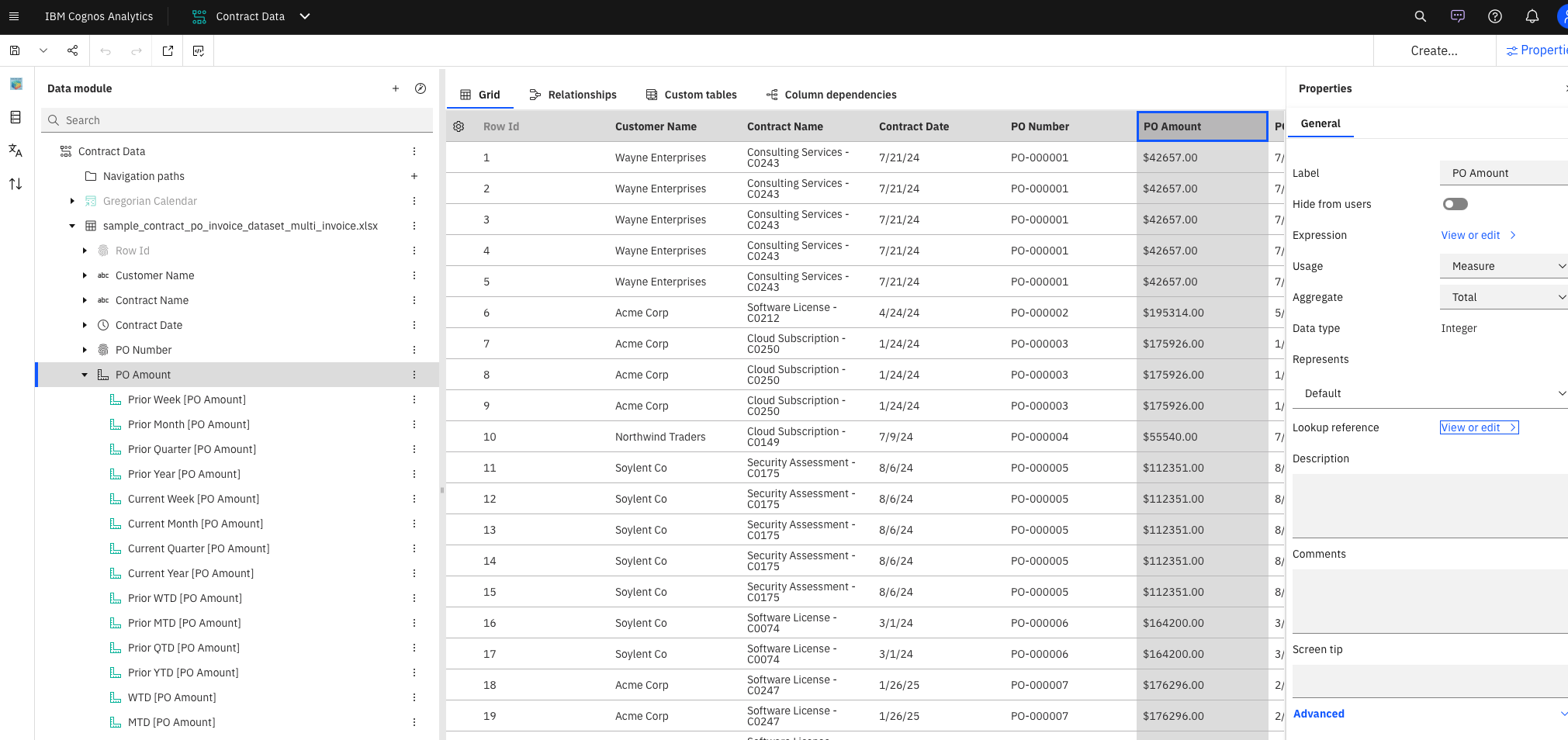
Relative time in Cognos does not fully activate until it is associated with a fact (measure).
The Step That Unlocks Everything
After you:
- Add and model your calendar table
- Create relationships to your fact data
You must take one more step:
Assign relative time to a measure (fact)
This is the moment where Cognos understands how to apply time logic to actual data.
Without this step:
- Relative time filters may appear
- But calculations won’t behave as expected
- Comparisons like PYTD vs YTD can break or return incomplete results
With this step:
- Time intelligence becomes consistent
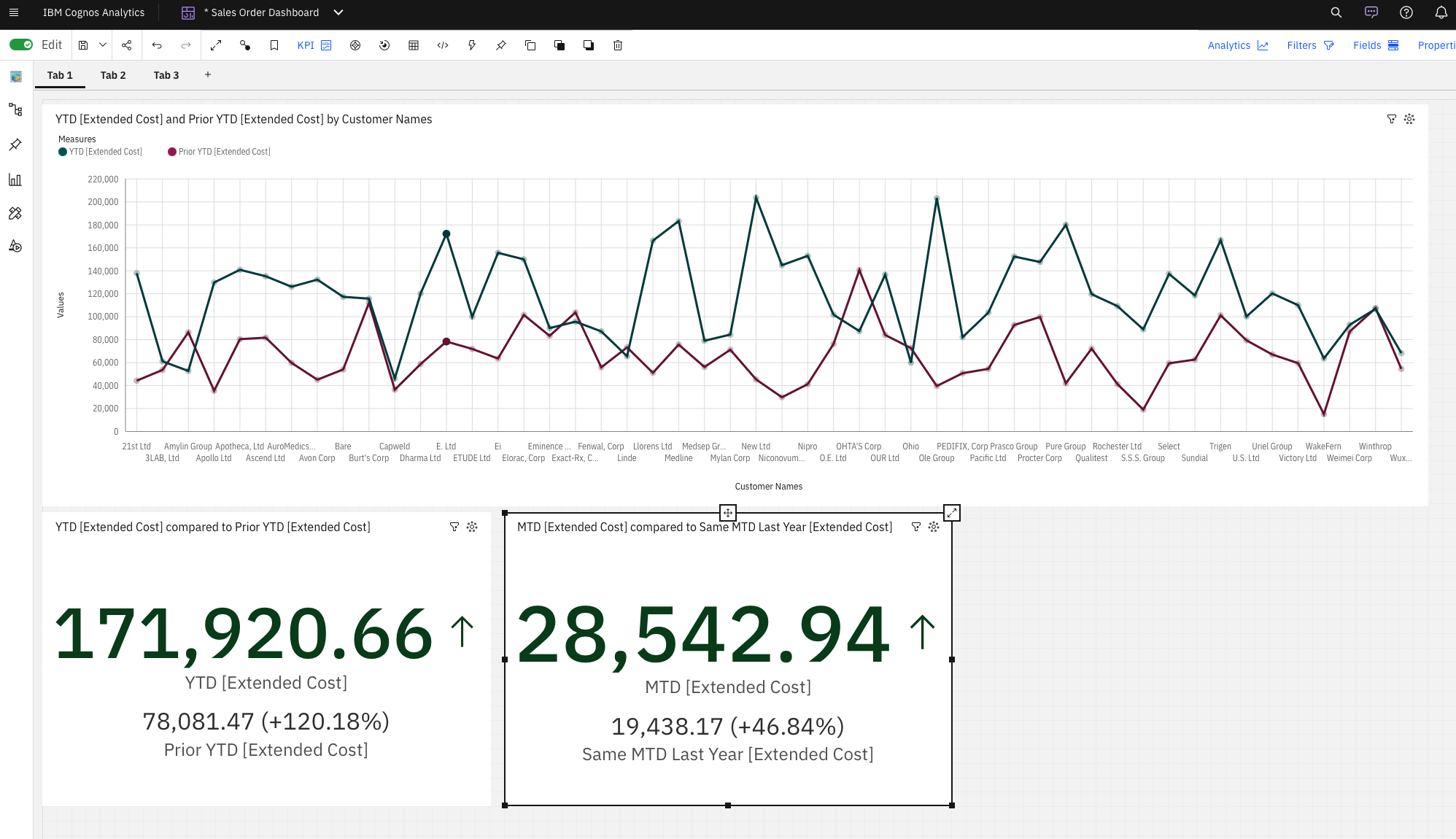
- Measures dynamically respond to relative filters
- Reports behave the way business users expect
Why This Step Is So Often Missed
Because Cognos doesn’t make it obvious.
From a UI perspective, it looks like:
- You’ve already configured relative time
- The calendar is doing the work
But under the hood, Cognos needs:
- A measure context
- A clear definition of what should be aggregated over time
Without tying relative time to a measure, you’ve only done half the job.
What This Unlocks for Your Organization
When relative time is fully implemented (including measure assignment), you enable:
- True Self-Service Reporting
Users can select YTD, PYTD, or rolling periods without needing new reports built.
- Consistent Time Definitions
No more debates about what “YTD” means—it’s defined once and reused everywhere.
- Faster Development
Build once. Reuse across dashboards, reports, and data modules.
- Scalable Analytics
As your data grows, your time logic doesn’t need to be rebuilt.
A Consultant’s Perspective
This is one of those details that separates a working Cognos environment from a high-performing analytics platform
Anyone can connect a calendar.
But understanding how Cognos applies time logic to measures—that’s where real value is created.
And it’s also where small oversights can quietly undermine your reporting.
Wrapping Up
If your relative time setup feels inconsistent, confusing, or “off,” there’s a good chance this is the missing piece.
Because in Cognos Analytics:
Relative time isn’t just about dates.
It’s about how those dates interact with your measures.
Want to See What You’re Missing?
If you have Cognos Analytics and aren’t fully confident in your relative time setup, it’s worth taking a closer look.
At Lodestar Solutions, we help clients identify gaps like this all the time—often uncovering capabilities they already own but aren’t fully leveraging.
📩 Reach out to support@lodestarsolutions.com or book a complimentary call with our Cognos Analytics team expert, Mike Bernaiche, here.
We’ll walk through what you have, what’s possible, and how to get more value out of it—no sales pitch, just practical guidance.